
Hyper-text Transfer Protocol.. or Hyper-media Transfer Protocol?
· 10 min · protocol, networking, http
General Topic: Protocol | Status: In Progress
Sources:
- Everything you need to know about HTTP
- Fundamentals of Backend Communications and Protocols
- HTTP/1 to HTTP/2 to HTTP/3
- HTTP/3 From A To Z: Core Concepts — Smashing Magazine
In a Nutshell…
HTTP is a protocol that’s built on top of the TCP/IP protocol. It is used as one of the standards to transport data on the internet. It resides in the application layer (highest level) in the TCP/IP model.
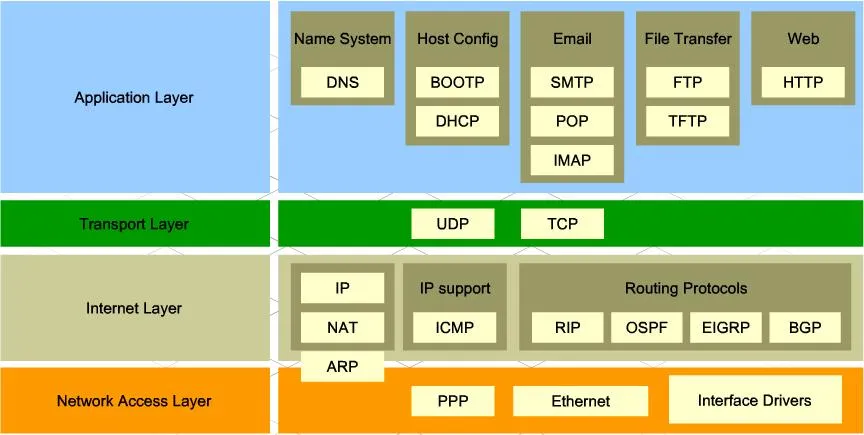
As it is built on top of TCP/IP, by default it uses TCP’s port, which is port 80. HTTPS, however, uses port 443.
Versions
-
There were no headers, the only method allowed is GET, and the response has to be HTML. Pretty sucky by today’s standards, wouldn’t you think?
-
Request/Response Example:
GET /index.html(response body) (connection closed)
All in all, it’s a pretty straightforward protocol.
-
-
HTTP/1.0 (1996)
Headers got added, more methods added (POST and HEAD), new request/response formats, status codes were added, and the response could now deal with other formats such as images, videos, plain texts, etc.
Many other useful and interesting things got added here. Now, this is far more usable by today’s standards.
-
Request/Response Example:
GET / HTTP/1.0
Host: cs.fyi
User-Agent: Mozilla/5.0 (Macintosh; Intel Mac OS X 10_10_5)
Accept: */*
HTTP/1.0 200 OK Content-Type: text/plain Content-Length: 137582 Expires: Thu, 05 Dec 1997 16:00:00 GMT Last-Modified: Wed, 5 August 1996 15:55:28 GMT Server: Apache 0.84 (response body) (connection closed)
Quite an interesting statement from cs.fyi while we’re here.. HTTP stands for Hyper-text Transfer Protocol. But wait, now you could transfer images, videos, and other formats as well? It should’ve been HMTP or Hyper-media Transfer Protocol then.. lol
The major drawback is that this version could not have multiple requests per connection. So, each time a client needs something from the server, it will need to open up a new TCP connection. Why is it a drawback? Well, so long as you don’t care about performance, it shouldn’t be a problem. Imagine opening a site: each time you access a page you load every .js, .html, and other file from the server again. It gets annoying. Not to mention that establishing a new TCP connection requires a three-way handshake to be completed.
To put it into perspective,
You basically cold start a Windows PC that uses HDD as its main drive each time you open or reload a page. It’s pretty darn slow.

-
-
New methods added (PUT, PATCH, OPTIONS, DELETE), it now has persistent connections (more on it later), the client could now send multiple requests to the server, and many more features added.
If you’d like to understand the key differences between HTTP/1.0 and HTTP/1.1, go check it out here.
To this day, HTTP/1.1 is still widely used on the internet. Even though HTTP/2.0 and HTTP/3.0 have already been introduced. I guess, this version alone has most of the features that would be used even in today’s standards. Not to mention it’s been there since 1997, which means most of what’s on the internet is using HTTP/1.1. That being said, it is by no means flaw-free. As you may know, there are more resource-intensive sites now more than ever. And this version is pretty slow due to its limitation in establishing many connections at the same time per server (the limit is not set by the protocol itself, but by the client, which in this case is a web browser). For example, AFAIK, Chrome limits up to 6 connections at once per server for HTTP/1.1.
So if your website needs to load more than 6 files, the rest of the files have to wait until any of those 6 connections are closed first. Therefore, it would lead to more delay due to said overhead.
-
HTTP/2 (2015)
18 years later, HTTP/2 was born. It was designed for low latency transport of content. In this version, it uses binary instead of text, it has introduced multiplexing, the header is compressed using HPACK, it’s possible to have multiple responses for a single request, and more.
Other than the new stuff they added in this new version, the underlying is still pretty much the same as that of HTTP/1.1.
Even the header format is still the same.
Now, however, due to its use of Binary Protocol, it is no longer human-readable.
If you’d like to learn more about its specs, you could read it here.
-
HTTP/3 (2022)
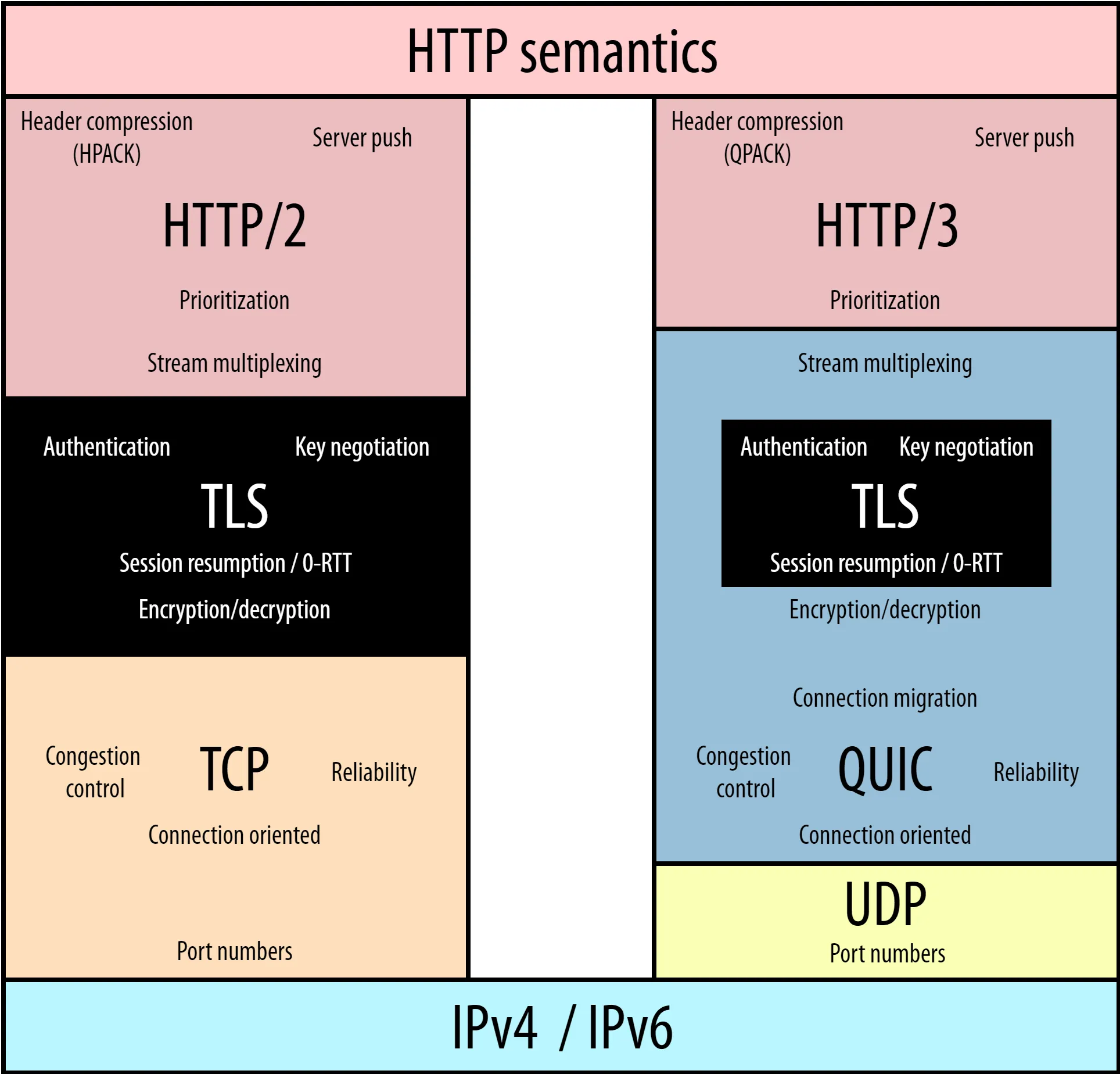
HTTP/3 is fundamentally a tweaked HTTP/2 to allow it to sit on top of the QUIC protocol. It could’ve been named HTTP/2-over-QUIC but due to marketing and clarity reasons (according to Smashing Magazine).
So then the important question is: what is QUIC, and why does it exist?
Well, QUIC stands for Quick UDP Internet Connection**.**
QUIC was introduced to fix the fundamental problem of HTTP, which is the transport protocol. TCP is too old, with a lot of issues for today’s standards. But changing TCP directly isn’t an option. The end clients (phones, PCs, laptops) could be upgraded, but all the devices in the middle (firewalls, servers, proxies) cannot, and the internet would crumble apart.. slowly.. surely..
QUIC itself is another generic transport protocol, much like TCP and UDP. So then why is it sitting on top of UDP? The reason is the same as above. It’s that all of the devices on the internet would need to be updated first to recognize QUIC.
Although it’s recently introduced (since the initial draft in 2020), it’s already been used by 25% of the websites.
Did You Know?
UDP, or User Datagram Protocol, is the bare-bones transport protocol. It only carries port numbers (like HTTP on port 80 or DNS on port 53). No handshake, no connection setup, just raw speed. If a packet gets lost, UDP doesn't care and won't resend it. That best-effort behavior keeps it blazing fast, at the cost of reliability. It shines in live, high-frequency updates where the newest data matters more than completeness, like video calls or online gaming. DNS uses it too, since a lookup only needs one round trip. When milliseconds matter, UDP is the answer.